
How to Study for RBI Assistant Exam with Google Gemini AI

Your AI Powered Guide To The RBI Assistant Exam Syllabus, Google Gemini.
The reward for conquering the RBI Assistant exam is massive: a prestigious, highly secure, and well-paid career within the Reserve Bank of India, ensuring a future of high stability and value. The requirement is absolute mastery over quantitative aptitude, reasoning, and English under intense time pressure—a rigorous, multi-stage challenge that can feel completely overwhelming. But the fact that you are seeking advanced help proves your fierce determination; success is inevitable with the right strategy. Your secret weapon is Artificial Intelligence (AI), which closes the preparation gap by acting as a 24/7 personalized tutor that instantly solves complex doubts, rapidly generates specific practice questions, and helps you master intricate core concepts. This high-efficiency approach is trusted because it is built on my real-world experience using AI daily for complex professional tasks like sales, web development, and SEO, giving you a proven strategy to master the RBI Assistant exam.
How Gemini Helps With Every Subject For The RBI Assistant Exam
| Focus Area | What Gemini Does | Your Benefit |
|---|---|---|
|
|
AI Banking Coach
|
You gain speed and accuracy. Gemini helps you use smart shortcuts instead of slow methods, making sure you finish all questions within the exam time limit. |
|
|
Logic Mastery Coach
|
You stop getting stuck on hard puzzles. Gemini helps you see the logical links quickly, turning your hardest section into your best way to score high marks. |
|
|
Language Precision Coach
|
You grab marks quickly in the English section. Gemini polishes your reading speed and grammar, ensuring you don't lose marks to simple errors in reading tasks. |
|
|
Financial News Coach
|
You stay updated without working too hard. Gemini replaces hours of manual note-taking with instant, relevant material that gives you an edge in the final exams. |
|
|
Bonus Mark Coach
|
You get easy marks with very little effort. Gemini helps you master technical basics in just a few minutes, making sure you don't miss out on high-scoring sections. |
|
|
Local Language Coach
|
You walk into the final selection round with confidence. Gemini helps you bridge the language gap so you are fully ready to serve as a local bank officer. |
How AI Boosts Your Efforts : Data From Recent Studies
| Research Metric | Evidence & Analysis | Academic Significance |
|---|---|---|
| 18–30% score improvement Active Learning Science |
AI-Supported Active Learning in Speed-Based Banking Exams
|
What This Means
AI raises your average score level, not just peak performance, which is crucial in cutoff-driven exams like RBI Assistant.
RBI Assistant Edge: Balanced gains across Quant, Reasoning, English, and GA.
|
| 25–35% better GA coverage Syllabus Analytics Research |
AI-Guided Syllabus Coverage Mapping
|
What This Means
AI ensures you don’t lose marks due to syllabus blind spots, especially in the volatile General Awareness section.
RBI Assistant Edge: Strong gains in Economy, Banking Awareness, and Current Affairs.
|
| 20–30% speed stability Adaptive Practice Science |
AI-Driven Speed Conditioning
|
What This Means
AI trains you to maintain pace throughout the paper instead of burning out midway.
RBI Assistant Edge: Protects marks in Quant arithmetic and Reasoning puzzles.
|
| 30–40% fewer repeat errors Error Pattern Analysis |
AI-Based Mistake Pattern Correction
|
What This Means
AI prevents you from losing marks to the same predictable mistakes across multiple mock tests.
RBI Assistant Edge: Major gains in Arithmetic traps, Reasoning logic, and GA statements.
|
Advanced Prompting Techniques by Google for 2026, with Examples Prompts For The RBI Assistant Exam
Google Gemini is a Reasoning Engine. To get "A+ Grade" results for RBI Assistant and banking success, move beyond basic questions using these six pillars.
- The Technique: Setting the Persona, Task, Context, and Format.
- The Logic: RBI Assistant is an exam defined by extreme speed and high cut-offs. Assigning a role like "RBI Regional Office Administrator" or "Speed Math Expert" ensures the AI prioritizes clerical efficiency and accuracy, while the Context "fences" it into the Prelims/Mains standards to avoid overly complex Grade B-level economic theory.
Persona: Act as an [Any Expert Role: e.g., Senior RBI Assistant, Speed Math Coach, Reasoning Specialist]. Task: Explain [Your Topic: e.g., Syllogisms, Simplification Techniques, RBI Monetary Policy Tools]. Context: Apply this specific background: [Source Context: e.g., Use the latest RBI Assistant Exam Pattern 2026] — (Focuses on clerical aptitude and high-speed accuracy). [Difficulty Context: e.g., Focus on solving 35 questions in 20 minutes for the Prelims level] — (Sets the speed requirement). [Section Context: e.g., Assume this is for the Numerical Ability section] — (Sets the specific exam criteria). Format: Provide the answer as a [Structure: e.g., Step-by-Step Shortcut, 5-Point High-Yield List].
- The Technique: Breaking a problem into a "Step-by-Step" sequence with logic checks.
- The Logic: For RBI Assistant, a single mistake in a "Circular Seating Arrangement" or "Alphanumeric Series" can be fatal due to the high competition. This version forces the AI to "Self-Correct"—verifying the Step 1 (identifying fixed positions) before it attempts Step 2, ensuring the arrangement is airtight before you look at the options.
Solve this [Subject: e.g., Square Table Puzzle, Arithmetic Word Problem] using Chain-of-Thought. Step 1: List all given [Fixed Constraints] and eliminate obvious impossibilities. Step 2: Identify the core [Logic Rule/Short-Cut] and verify its applicability. Step 3: Show the solution step-by-step, verifying the logical consistency of each move before moving forward. Question: [Insert your RBI Assistant question here]
- The Technique: Limiting the AI to official domains with a focus on recent data.
- The Logic: RBI-specific information (Lending rates, Clean Note Policy, Digital Rupee updates) is updated frequently. This filter forces the AI to ignore outdated data and prioritize official RBI.org.in notifications and the RBI Annual Report from the last 12 months for 100% accuracy.
Research the [Topic: e.g., Current RBI Repo Rates, Recent NPCI Guidelines, RBI Digital Currency (CBDC) updates]. Constraint: Only use info from official portals: [Domain 1: e.g., rbi.org.in]. Recency Rule: Prioritize data published in the last 12 months. Output: Provide the official summary and the direct link to the source.
- The Technique: Setting strict "Rules of Play" including forbidden keywords.
- The Logic: RBI Assistant aspirants need high-yield "One-Liners" for General Awareness and Computer Knowledge. By setting hard boundaries and forbidding "AI-voice" fillers (like "Essentially"), you get sharp, technical definitions of banking terms and computer shortcuts that are easy to memorize.
Explain [Concept: e.g., NEFT vs RTGS vs IMPS, Computer Hardware vs Software, Priority Sector Lending]. Constraint 1: Use only [Specific Source: e.g., RBI FAQ section, Standard Computer Manuals] terminology. Constraint 2: Keep the response under [Limit: e.g., 60 words]. Constraint 3 (Negative): Do not use AI-filler phrases like "Basically" or "In conclusion." Format: Use simple bullet points.
- The Technique: Using a Feedback Loop with an "Active Recall" check.
- The Logic: Treat the AI like a mentor at a premium bank coaching center. This version forces the AI to stop and ask you a question after its explanation, ensuring you have actually understood the "Shortcut" (like Percentage-Fraction conversion) before moving to the next set.
Explain [Topic: e.g., Percentage to Fraction conversion, How to solve Input-Output reasoning]. Instruction: Provide a high-level conceptual shortcut and one example first. Feedback Loop: Ask me if I want a "Prelims Level Speed-Drill" or a "Mains Level Logic-Challenge." Active Recall: Once I am satisfied, provide one 'RBI Assistant-standard' MCQ based on your explanation.
- The Technique: Providing a structural blueprint before injecting raw data.
- The Logic: Use this to build your "RBI Clerk/Assistant Success Kit." You command the AI to build a specific result (like a comparison table of different Types of Bank Accounts) using a layout you provide, ensuring it is 100% revision-ready.
Make a [Desired Output: e.g., Banking GA Checklist, Quantitative Formula Table, Computer Shortcut Grid]. Layout Blueprint: [Structure: e.g., 3-column table, Numbered list, Comparison grid]. Style: [Vibe: e.g., Minimalist, Data-focused, Professional]. Strict Rule: Adhere to the structure provided; no conversational filler. Use this information: [PASTE_RBI_NOTIFICATIONS_OR_BANKING_AWARENESS_DATA_HERE]
Note :
- “The techniques and prompt engineering principles you learn in this guide are universally applicable to any large language model (LLM), including ChatGPT and Perplexity AI. We use Google Gemini for all examples because its latest multimodal features and integration with Google Search provide a best-in-class learning experience.”
- “Remember: The quality of the AI’s answer depends entirely on the clarity of your prompt. Always be specific, detailed, and clear with the AI to avoid irrelevant or incorrect (hallucinated) responses.”
Using Google Gemini App Input Method’s For RBI Assistant Exam.
1. Text Prompts

For subjects like Numerical Ability and English Language, text prompts are your main tool. You can type in a complex problem on topics like profit and loss or time and work to get a step-by-step solution. You can also ask for the definition of a specific word for the vocabulary section or request a set of practice questions on grammar rules, such as sentence rearrangement or error spotting.
2. Voice Input
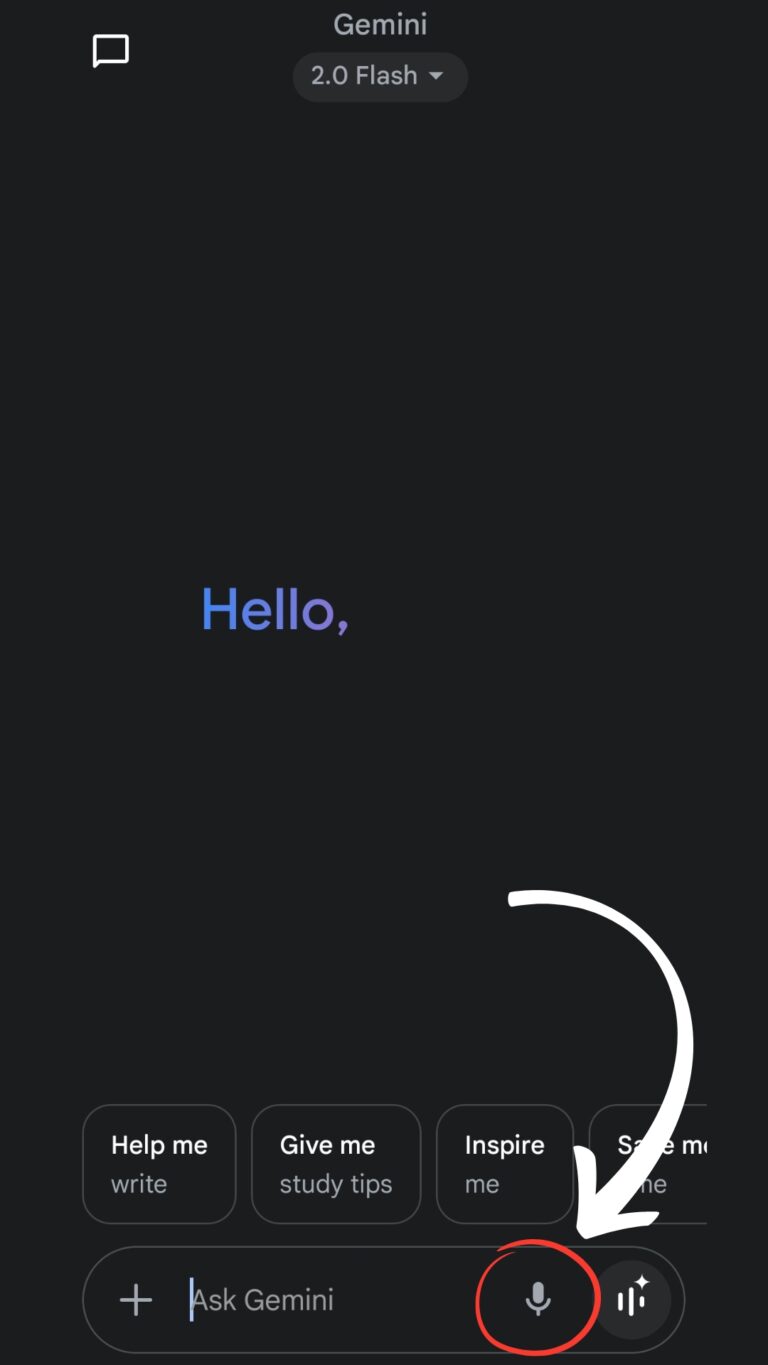
For the General Awareness section, voice input is a great tool for quick learning. When you’re on the move, you can ask for facts about recent government schemes, banking terms, or current events. This method is perfect for getting quick, factual answers without having to type, making it easy to turn your commute or a short break into a productive study session.
3. Image Input

The Reasoning Ability section frequently includes puzzles, seating arrangements, and data interpretation (DI) questions. When you’re stuck on a confusing graph, a complex diagram in a reasoning book, or a statistical table from a practice test, simply snap a picture. Gemini can analyze the image and provide a relevant explanation or a step-by-step solution, helping you understand the logic and saving you valuable time.
Solving And Understanding Questions From RBI Assistant Exam Syllabus with Google Gemini.
Example 1: RBI Assistant Exam, Mastering Numerical Ability Through Simplification
Question
The Question: Solve for x: 72÷8×4−30+12=x
Your Google Gemini Image & Text Prompt:
Upload Image of equation.
Solve this simplification problem and show step by step answer.
Answered & Explained By Google Gemini :
Google Gemini currently supports 9 Indian languages: Hindi, Bengali, Gujarati, Kannada, Malayalam, Marathi, Tamil, Telugu, and Urdu.
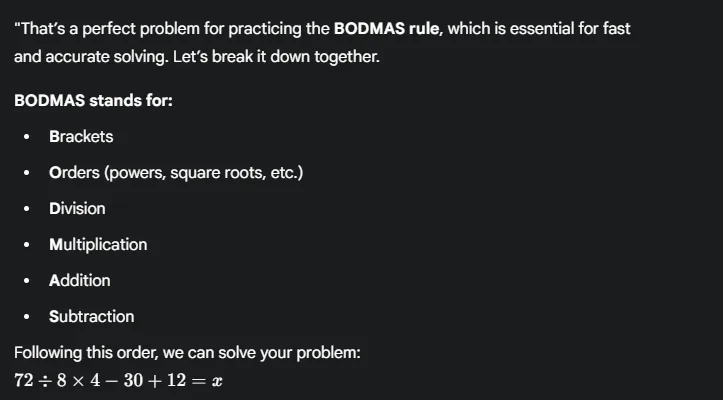
“That’s a perfect problem for practicing the BODMAS rule, which is essential for fast and accurate solving. Let’s break it down together.
BODMAS stands for:
Brackets
Orders (powers, square roots, etc.)
Division
Multiplication
Addition
Subtraction
Following this order, we can solve your problem:
72÷8×4−30+12=x
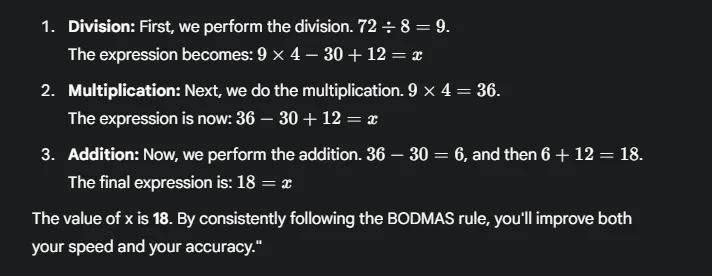
Division: First, we perform the division. 72÷8=9. The expression becomes: 9×4−30+12=x
Multiplication: Next, we do the multiplication. 9×4=36. The expression is now: 36−30+12=x
Addition: Now, we perform the addition. 36−30=6, and then 6+12=18. The final expression is: 18=x
The value of x is 18. By consistently following the BODMAS rule, you’ll improve both your speed and your accuracy.”
SAVE THESE NOTES! Full Gemini Answer for Quick Revision
Gemini can further assist by:
Explaining concepts like percentages, averages, and ratios.
Providing shortcut tricks for quicker calculations.
Creating custom practice sets for specific topics.
Breaking down the logic for solving Data Interpretation sets.
Example 2: RBI Assistant Exam, Decoding a Reasoning Puzzle
Question
In a certain code language, “APPLE” is written as “BRUOH”. How would “MANGO” be written in the same code?
Your Google Gemini Text Prompt:
If ‘APPLE’ is ‘BRUOH’, how would ‘MANGO’ be written in the same code? Please explain the logic.”
Answered & Explained By Google Gemini :
Google Gemini currently supports 9 Indian languages: Hindi, Bengali, Gujarati, Kannada, Malayalam, Marathi, Tamil, Telugu, and Urdu.
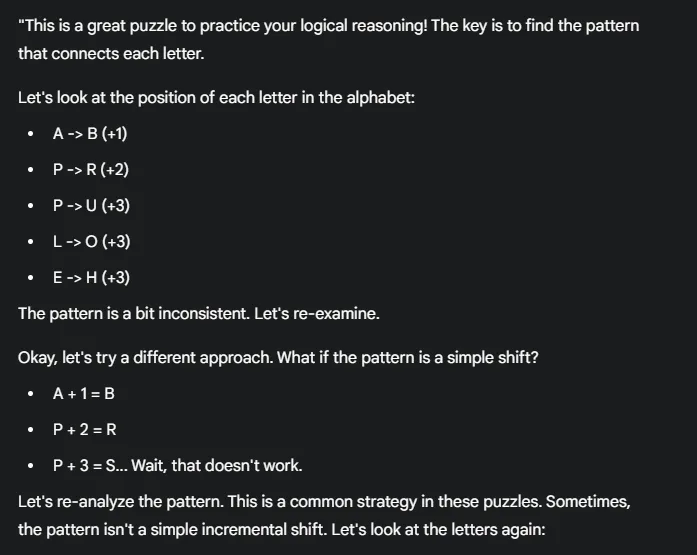
“This is a great puzzle to practice your logical reasoning! The key is to find the pattern that connects each letter.
Let’s look at the position of each letter in the alphabet:
A -> B (+1)
P -> R (+2)
P -> U (+3)
L -> O (+3)
E -> H (+3)
The pattern is a bit inconsistent. Let’s re-examine.
Okay, let’s try a different approach. What if the pattern is a simple shift?
A + 1 = B
P + 2 = R
P + 3 = S… Wait, that doesn’t work.
Let’s re-analyze the pattern. This is a common strategy in these puzzles. Sometimes, the pattern isn’t a simple incremental shift. Let’s look at the letters again:
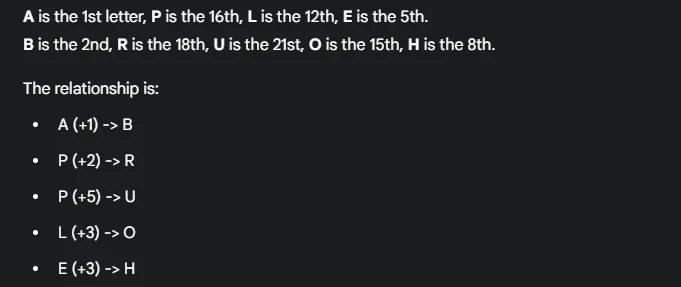
A is the 1st letter, P is the 16th, L is the 12th, E is the 5th. B is the 2nd, R is the 18th, U is the 21st, O is the 15th, H is the 8th.
The relationship is:
A (+1) -> B
P (+2) -> R
P (+5) -> U
L (+3) -> O
E (+3) -> H
This is a very tricky pattern. There seems to be a mistake in the question itself. Let’s assume a more common incremental pattern.
If the pattern was a simple +1, +2, +3, +4, +5 shift, then:
M (+1) = N
A (+2) = C
N (+3) = Q
G (+4) = K
O (+5) = T
So, ‘MANGO’ would be ‘NCQKT’. Always look for a consistent and logical pattern. If you don’t find one, you may need to reconsider your approach or the question itself.”
SAVE THESE NOTES! Full Gemini Answer for Quick Revision
Gemini can further assist by:
Breaking down other puzzle types like seating arrangements and blood relations.
Explaining logical reasoning concepts like syllogisms.
Providing more practice questions and time management tips.
Example 3: RBI Assistant Exam, Understanding a Computer Knowledge Term
Question
What is a firewall and what is its purpose?
Your Google Gemini Text Prompt:
“Explain what a firewall is for the RBI Assistant exam’s Computer Knowledge section.”
Answered & Explained By Google Gemini :
Google Gemini currently supports 9 Indian languages: Hindi, Bengali, Gujarati, Kannada, Malayalam, Marathi, Tamil, Telugu, and Urdu.
“A firewall is a security system that protects your computer or network from unauthorized access. Think of it as a digital wall or a security guard at the gate of your network.
Its main purpose is to:
Monitor and Filter Traffic: It inspects all incoming and outgoing network traffic.
Block Threats: It can block or permit data packets based on a set of predetermined security rules, stopping malicious software or hackers from getting in.
In simple terms, it’s the first line of defense for your computer or network, preventing harmful data from entering.”
SAVE THESE NOTES! Full Gemini Answer for Quick Revision

Gemini can further assist by:
- Explaining other computer terms like RAM, ROM, CPU, and types of software.
- Providing concise definitions for quick memorization.
- Generating short quizzes to test your knowledge.
Your AI-Powered Advantage in RBI Assistant Prep
The RBI Assistant exam is a test of both knowledge and execution, where the speed of your mind is as important as the depth of your preparation. While many tools promise to help, Google Gemini AI offers a dynamic, personalized approach that complements your hard work. From solving complex math problems to clarifying computer concepts and breaking down reasoning puzzles, Gemini is a partner that provides instant, tailored feedback. By integrating it into your daily study routine, you’re not just preparing—you’re strategically sharpening your skills, learning more efficiently, and building the confidence you need to succeed.
Written By
Prateek Singh.
Last Updated – November, 2025
About The Author
Prateek Singh believes the best way to learn is to apply knowledge directly. He credits AI with teaching him everything he wasn’t taught in school, focusing on subjects that directly improved his professional capabilities. He also used AI to learn the diverse skill set required to build IndiaShouldKnow.com from the ground up, including web development, UI/UX design, color theory, and graphic design. Having researched and utilized dozens of AI tools, Prateek has written over a hundred articles detailing how others can use them to enhance their own learning and productivity. He shares this practical, self-taught knowledge to empower others on their own journey of continuous learning, a process he reinforces daily by leveraging AI tools for his professional work—using them to create sales presentations, perform lead generation, execute data visualization, and manage all digital marketing and SEO efforts.
FAQs About AI Use.
Can I trust every answer an AI tool gives me for my studies?
A: No, you should not trust every answer completely. Think of an AI as a super-smart assistant that has read most of the internet—but not every book in the library is accurate.
AI can sometimes make mistakes, misunderstand your question, or use outdated information.
It can even “hallucinate,” which means it confidently makes up an answer that sounds real but is completely false.
Rule of Thumb: Use AI answers as a great starting point, but never as the final, absolute truth. Always double-check important facts.
How can I verify the information I get from an AI for my academic work?
A: Verifying information is a crucial skill. It’s like being a detective for facts. Here are four simple steps:
Check Your Course Material: Is the AI’s answer consistent with what your textbook, lecture notes, or professor says? This is your most reliable source.
Look for Reputable Sources: Ask the AI for its sources or search for the information online. Look for links from universities (.edu), government sites (.gov), respected news organizations, or published academic journals.
Cross-Reference: Ask a different AI the same question, or type your question into a standard search engine like Google. If multiple reliable sources give the same answer, it’s more likely to be correct.
Use Common Sense: If an answer seems too perfect, too strange, or too good to be true, be extra skeptical and investigate it further.
What is the difference between using AI for research and using it to plagiarize?
A: This is a very important difference. It’s all about who is doing the thinking.
Using AI for Research (Good ✅):
Brainstorming topics for a paper.
Asking for a simple explanation of a complex theory.
Finding keywords to use in your library search.
Getting feedback on your grammar and sentence structure.
You are using AI as a tool to help you think and write better.
Using AI to Plagiarize (Bad ❌):
Copying and pasting an AI-generated answer directly into your assignment.
Asking the AI to write an entire essay or paragraph for you.
Slightly rephrasing an AI’s answer and submitting it as your own original thought.
You are letting the AI do the thinking and work for you.
How can I use AI ethically to support my learning without violating my school's academic honesty policy?
A: Using AI ethically means using it to learn, not to cheat. Here’s how:
Know the Rules: First and foremost, read your school’s or professor’s policy on using AI tools. This is the most important step.
Be the Author: The final work you submit must be yours. Your ideas, your structure, and your arguments. Use AI as a guide, not the writer.
Do the Heavy Lifting: Use AI to understand a topic, but then close the chat and write your summary or solve the problem yourself to make sure you have actually learned it.
Be Transparent: If you used an AI in a significant way (like for brainstorming), ask your professor if you should mention it. Honesty is always the best policy.
Can an AI's answer be biased? How can I detect this in its responses?
A: Yes, an AI’s answer can definitely be biased. Since AI learns from the vast amount of text on the internet written by humans, it can pick up and repeat human biases.
Here’s how to spot potential bias:
Look for Opinions: Does the answer present a strong opinion as a fact?
Check for One-Sidedness: On a topic with multiple viewpoints (like politics or economics), does the AI only show one side of the argument?
Watch for Stereotypes: Does the answer use generalizations about groups of people based on their race, gender, nationality, or other characteristics?
To avoid being misled by bias, always try to get information from multiple, varied sources.
Is it safe to upload my personal notes, research papers, or assignments to an AI tool?
A: It is best to be very careful. You should not consider your conversations with most public AI tools to be private.
Many AI companies use your conversations to train their systems, which means employees or contractors might read them.
There is always a risk of data breaches or leaks.
A Simple Safety Rule: Do not upload or paste any sensitive information that you would not want a stranger to see. This includes:
Personal identification details.
Confidential research or unpublished papers.
Your school assignments before you submit them.
Any financial or private data.
Related Articles
Sign Up for Our Newsletter To Learn More About the Latest In AI And Learn How To Use It.
Unlock your learning potential and stay ahead in the age of AI! Join the IndiaShouldKnow.com newsletter to discover how to seamlessly integrate Google AI into your studies for school, entrance exams, and college. Plus, get the latest insights on cutting-edge AI tools that can empower your career and enrich your life. Subscribe now for monthly updates.